Static Maps Have Never Looked This Good!

Tuesday, April 29, 2008 at 3:09:00 PM

Do you ever find yourself using our Static Maps API, wishing you could cover your maps with markers of all sorts of colors, sizes, and letters, or that you could draw lines all over the map? Well, today is your lucky day. Check out these new features in the Static Maps API (and the kind of output you can get from it!) below:

  • More marker options: You can now specify 4 different sizes (from normal to tiny), and 8 different colors (and for half of the sizes, you can specify a letter as well).
  • Paths: You can specify a path of up to 50 points, along with color, weight, and alpha.
  • Image formats: You can specify PNG, JPG, or GIF output.
  • Transliterated tiles: You can explicitly specify a language, if you'd like transliterated tiles (for Greece or Japan, for example).

Feel free to play around with the options in the updated Static Map Wizard or read through the documentation. As usual, please post questions or comments in the forum. We'd love to see how developers are using this API and its newest features.

Google Developer Days: Meet the Google Geo Engineers

Wednesday, April 23, 2008 at 10:48:00 PM

Google Developer Days 2008, a set of one-day developer events, are back and will take place in locations around the world. We've designed these events for developers with strong coding backgrounds, so that we can discuss our APIs, developer tools and applications.

We'll host Google Developer Days in these locations:

  • Yokohama, Japan (June 10)
  • Beijing, China (June 12)
  • Taipei, Taiwan (June 14)
  • Sydney, Australia (June 18)
  • Mexico City, Mexico (June 23)
  • Sao Paulo, Brazil (June 27)
  • London, UK (Sept 16)
  • Paris, France (Sept 18)
  • Munich, Germany (Sept 23)
  • Madrid, Spain (Sept 25)
  • Milan, Italy (Oct 21)
  • Prague, Czech (Oct 23)
  • Moscow, Russia (Oct 28)
If you're based in the US, we encourage you to come to Google I/O, on May 28-29 in San Francisco.

At Google Developer Day, our Maps and KML engineers will share their inside knowledge on our developer tools and APIs, including the Google Maps API and KML. In many locations we'll do deep dives into code and conduct hands-on codelabs. If you come to Yokohama and Mexico City, say hi to me and Pamela Fox.

We've posted detailed information for our early dates and will be adding more information for other locations soon. If you're a developer, we encourage you to sign-up for a Google Developer Day at a nearby location. I hope to see you there.

Streetview in the Wild: A Flourishing Species

Tuesday, April 22, 2008 at 5:58:00 PM

Several weeks ago, we announced the official release of Street View in the Maps API and invited developers to post examples of their Street View mashups. We crossed our fingers and hoped that we'd made the classes flexible and functional enough for developers to work with, and soon enough the examples started flowing in.

Here are some of my favorites:

DualMaps: For a given location, displays the Street View, Birds Eye View, and Google aerial map view simultaneously and lets you embed or share the result
Povo: A local reviews site specially for Boston. Displays street view in a lightbox for each location, and has made a Street View tour especially for the recent Boston Marathon.
StreetView Adventure Game: In the spirit of the classic interactive fiction games like Zork, this demo lets you play a short game that begins with chasing a guy trying to climb out a window in San Francisco.

Also check out VegasVision, Ong Map V2 (Alpha), VPike, FlyRig, Street View Gadget, LotView, Street View SF Tour, RealBird, Glotter and a Street View Tour Gadget. And if you loved Trulia's implementation (announced on Google LatLong last week), check out this demo that shows how to angle a street view panorama towards the side of the street that a building is on. (It involves math, but don't worry, we've done it for you.)

Thanks to all you developers for sharing your work with us, and as always, please post your examples or questions in the forum.

Our first Google Geo Developer series is over...but the YouTubes will last a lifetime!

Wednesday, April 16, 2008 at 10:36:00 AM

Two months ago, we announced the start of the Google Geo Developer series on this blog. The point of the series was to bring together local geo developers for intimate talks/discussions around Maps/KML topics, and then let all developers watch the events on YouTube. It was a bit of an experiment - would we find enough topics for talks every week? Would anyone watch the videos? Well, I'm happy to say it was a successful experiment. Besides having 6 great talks and more than 20,000 YouTube video views, we also met a bunch of local developers working on geo projects (thanks for always showing up, you guys), and even met some folks from far away through the mailing list. Hopefully we'll get to hold another of these series in the falls, so subscribe to the mailing list if you want to find out about future events.

Here's a roundup of the talks that went down, with links to videos. Click "More info" on the YouTube description and you'll often find a link to slides/materials.

  • Quick & Dirty KML Creation: With Mano Marks, Pamela Fox, and Christiaan Adams
    A demonstration of creating KML visually in Google Earth & Google Maps, and using Spreadsheet Mapper 2.0
  • Creating Custom Maps: With John Coryat
    A comparison of various ways of overlaying data in the Maps API and an in-depth explanation of creating tile layers and custom map types
  • GigaPan In-Depth: With Randy Sargent & Ted Morse
    A demo of the GigaPan panorama-browsing website and KML files, plus a technical explanation of PhotoOverlay
  • Dynamic KML: With Mano Marks & Brian Hamlin
    An exploration of using dynamic queries from KML, using the NetworkLink, httpQuery, and viewFormat elements, plus a demo of a PostGIS-generated NetworkLink
  • Mars, Moon, and Sky Map Types: With Noel Gorelick
    A talk introducing the non-Earth Maps API map types, plus cool demos of other types of projections used with planetary imagery
  • Mapping the Votes: With Michael Geary
    A whirlwind tour of what it took to create the Elections 2008 Map/Mapplet/Gadget, including SHPfile conversion, Javascript optimization, centroid calculations, Twitter updates collection, Mapplet API tricks, and more.
  • Google API Talks - Android, KML, Google Maps, Gadgets
    A series of 5-minute talks by various developers and Googlers given before Geary's presentation, including an intro to Gadgets/Mapplets.

KML is now an open standard

Monday, April 14, 2008 at 1:32:00 PM

The Google Geo APIs are all about building powerful tools to share geo information with the world. We've been really interested in seeing the way that KML has been used all across the web to express geographic content, and today we're very excited to announce that the Open Geospatial Consortium has announced its acceptance of KML 2.2 as an official OGC Standard. That means that KML is not just a Google Earth standard, it's not even just a Google standard. It is now an official standard for presenting geographic data. Read more about this great news on the LatLong blog.

Text images without (much) coding

Wednesday, April 02, 2008 at 8:48:00 PM


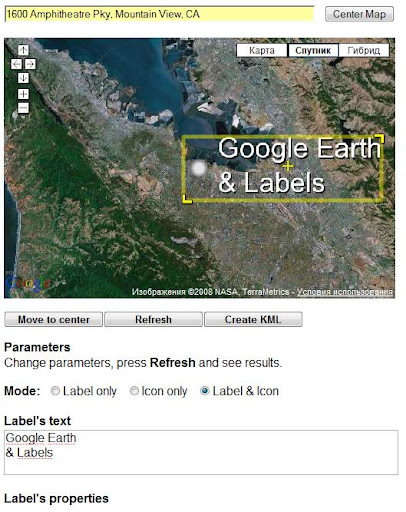
Valery Hronusov has created a cool visual interface for his Text to Image service. This service allows you to easily create a text image, control its color, add shadow effects, and then place it on directly a map. It outputs to KML, Maps API JavaScript code, or just a plain URL to an image. This is really useful to creating, for instance, road labels or text based ScreenOverlays. All you have to do is copy the output into your own code. The interface is pretty simple:

Here's a sample of the KML output:

<GroundOverlay>
  ...
     <Icon>
             <href>http://text2image.ning.com/TextToImage.php?text=San+Francisco%2C+here+we+come%21&LabelType=2&FontSize=24&casing=asis&alignment=1&font=arial&fontStyle=bold&LabelLocation=topleft&dX=11&dY=0&FontColor=00ff00f9&ShadowColor=00000000&depth=3&effect=0&LabelHeight=35&LabelWidth=438&IconHeight=18&IconName=http://maps.google.com/mapfiles/kml/shapes/shaded_dot.png</href>
     </Icon>

Here's a sample of the JavaScript code it creates:

var pointCenter = new GLatLng(37.775196,-122.419204);
var map = new GMap2(document.getElementById("map"));
map.setCenter(pointCenter, 10);

var pointSW = new GLatLng(37.741743,-122.470044);
var pointNE = new GLatLng(37.786659,-122.272387);

var groundOverlay = new GGroundOverlay(
   "http://text2image.ning.com/TextToImage.php?text=San+Francisco%2C+here+we+come%21&LabelType=2&FontSize=24&casing=asis&alignment=1&font=arial&fontStyle=bold&LabelLocation=topleft&dX=11&dY=0&FontColor=00ff00f9&ShadowColor=00000000&depth=3&effect=0&LabelHeight=35&LabelWidth=438&IconHeight=18&IconName=http://maps.google.com/mapfiles/kml/shapes/shaded_dot.png", 
   new GLatLngBounds(pointSW, pointNE));

map.addOverlay(groundOverlay);

And here's what it looks like: